The all-in-one newsroom system no longer fits the way modern teams work.
Content teams today manage more channels, faster deadlines, and more specialized formats than ever before. Instead of relying on one big platform, they’re choosing smaller tools that work better together.
At the center of this shift is an editorial planning tool like Kordiam. It helps teams organize their work, assign tasks, and keep content on track.
Why All-in-One Systems No Longer Work
Legacy systems tried to do everything. Planning, writing, layout, publishing. But they haven’t kept pace with the way content teams operate today.
Here’s what changed
- Teams now publish on more platforms. Websites, social media, newsletters, podcasts, and more
- New formats need specialized tools like editorial calendar software or newsroom planning apps
- No vendor can provide top-quality tools across every need
- APIs and integrations make it easier to connect tools with just a few steps
Teams expect software to match how they work. Not the other way around.
What a Modern Editorial Stack Looks Like
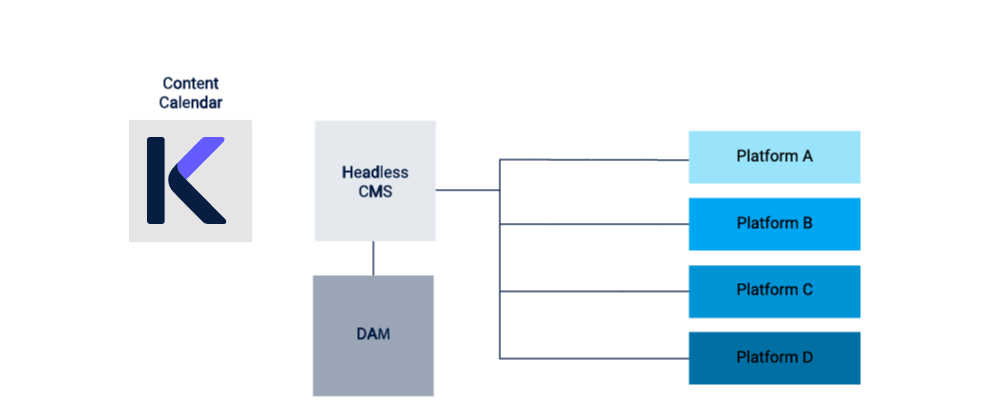
Most teams today use a few core tools that work well together
- A headless CMS to manage and structure content
- A digital asset management system for images, videos, and other files
- Tools for publishing to websites, social channels, and email
- Editorial calendar software to map strategy and track progress
This setup is easier to manage, more flexible, and simpler to scale
The Role of an Editorial Planning Tool
Kordiam gives content teams the structure they need from the start.
With Kordiam you can
- Plan what content is being created and why
- Assign work to the right people
- Track deadlines and publishing status
- Adapt quickly to breaking news or last-minute changes
- Keep your strategy front and center
Kordiam works whether you call it an editorial calendar, a content planning calendar, or a newsroom planning tool
How Kordiam Connects to Other Tools
Good integrations save time and reduce errors. With open documentation and clear APIs, Kordiam can connect to other systems with minimal setup.
There are three ways teams often integrate:
Connect with your CMS
Link Kordiam to your headless CMS. When you plan a story, it can automatically appear in your CMS with key details like the slug, description, and scheduled date. Edits can sync both ways depending on how the integration is set up. Erdee Media Groep plans around 100 stories a day in Kordiam across a newspaper, a family magazine, websites and apps, all connected to WoodWing. Read the case study.
Connect with your DAM
If you use a digital asset management system, Kordiam can pass assets from freelancers directly into the DAM. This helps reduce license costs and keeps workflows clean and secure. See how this works with huGO+.
Use it without integration
Some teams use Kordiam without connecting it to other tools. That works too. Many find it helpful even without a direct link to their CMS or DAM
Why Flexibility Matters
Modern content teams need tools that match how they actually work. Kordiam gives you the ability to plan, assign, track, and adjust in one place.
Used with a headless CMS and a DAM system, Kordiam helps you
- See the full picture of what’s happening
- Move faster with less confusion
- Keep everyone on the same page
- Align daily work with big-picture goals
Whether you’re part of a growing newsroom or a lean editorial team, Kordiam brings clarity and control to your workflow
Want to see what tools Kordiam integrates with? Check out our integrations page.