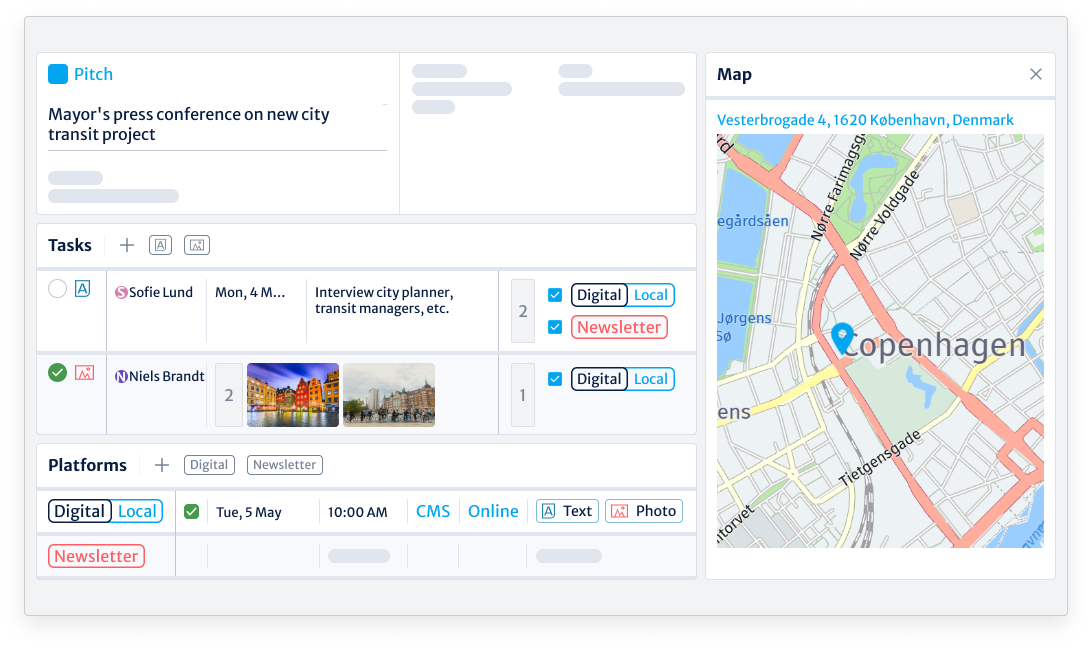
Every story created by an editorial team passes through many hands before publication. A reporter pitches it, a section editor reviews and assigns it, a managing editor slots it into a day and time, freelancers may be hired to supply photos and a producer shapes it for each platform. Above all these hands, an editor-in-chief decides what the newsroom should cover in the first place.
Each of these people needs to see their own part of the work. They also need to see what everyone else is doing, so a delay in one area doesn’t surprise the next. Editorial workflow management software gives them this shared view.
This guide follows a single story from pitch to publication and shows what each role needs from the software at every step in the workflow.
What is editorial workflow management software?
Editorial workflow management software is a shared planning system where a newsroom tracks every story from first idea to publication. It shows who is working on what, what stage each story is in, where it will run and when it is due. Unlike a CMS, which handles publishing, it covers the planning and coordination that happen before and during production. Read more in our guide to newsroom software.
How do reporters use it at the pitch stage?
For reporters, the workflow starts with the idea for a story. In Kordiam, they create a Story Card for the pitch so editors see it right away instead of being buried in an email thread.
Story templates give recurring story types a consistent structure. Match reports, council meetings or an installment in an ongoing series can each have their own template with the right fields, platforms and tasks already filled in. Every pitch then arrives with the information editors need to decide on it.
Once a pitch is approved, reporters see their assignments in one place and update the status as they work. With the Slack integration, they can do this without leaving the tool they already use to talk to their teammates.
How do section editors use it to assign tasks?
Section editors use editorial workflow management software to turn approved story pitches into work. They assign the story to a reporter, add tasks for photos, graphics or a fact check and set a deadline for each. The Kordiam Story List shows their entire desk at a glance: what is assigned, what is late and who still has room for more tasks.
A generic project management tool can track tasks, but it isn’t built to handle the intricacies of an editorial story. It has no concept of publication slots, platforms or the way a story’s deadline depends on the edition or channel it is planned for. Editorial workflow management software is built around the story, so each task stays connected to the content it belongs to. When a story moves to a different day or platform, its tasks and deadlines move with it.
How do managing editors use it to run the daily story flow?
Managing editors need a view of everything across every desk. In the Story List they see all stories planned for the day with their target platforms, workflow status, publish times, assignees and delays.
This overview lets them act before a problem reaches the audience. They spot gaps in the story mix, such as a morning with no local stories or a day without anything for the newsletter. If news breaks or a story falls through, the managing editor can move stories between slots and the entire newsroom sees this updated plan at once.
At Finnish broadcaster Yle, that shared view was the reason for the switch. “We wanted all content creators to put their work in one system and see what others were doing,” says Anu Vilkman, Executive Producer. “Everyone working on a story is visible.”
How do freelancers fit into the workflow?
Freelancers and other outside contributors need enough access to do their job and nothing more. With external access to a Story Card, they see the task description, the deadline and any notes from the editor, but that’s all. They can’t view the rest of the newsroom’s plan or work on other stories.
External contributors upload their copy and assets directly to the Story Card, so editors no longer have to sort through email attachments and add them to the right story. With a DAM integration, photos and other files can go directly into the newsroom’s asset library, so they are stored, categorized and licensed in one place.
How do producers and channel managers use it for distribution?
Stories rarely run in only one place. A single story may appear on the website, in an app, in a newsletter, on social and in print — often in a different form or structure for each channel. Producers and channel managers plan these versions as part of the same story, with a publication slot for each platform.
This gives these roles a clear record of what runs when and where. With a sync via CMS integration, the plan and the publishing system stay in step, so a change in one shows up in the other.
How do editors-in-chief use it above the daily workflow?
While the other roles focus on the trees, editors-in-chief keep their eyes on the entire forest. They map the overall newsroom content strategy and check whether daily, weekly and monthly coverage matches it across teams and platforms.
With the Kordiam Topics feature, they group stories around a theme, campaign or a major event such as an election or the Olympics. Editors-in-chief can see how much the newsroom is publishing on each topic and spot where coverage is thin or where too many people are working on the same thing. This makes it easier to balance resources weeks ahead instead of reacting day to day.
What happens when breaking news skips the planning stage?
When news breaks, reporters naturally write straight into the CMS and publish within minutes. Nobody is going to stop and create the story within the plan first, and in this situation that’s the right call.
However, the cost of being quick and informative to your readers shows up later. The overall plan is now missing stories the newsroom actually published. The editor’s overview is incomplete. Reports on output per desk or topic are missing stats, and any automation that relies on planning data skips these stories.
A CMS integration closes this gap. Stories published directly into the CMS are then added to the plan automatically, so the planning view stays synced and contains a complete record of everything the newsroom has published, whether it was planned or not.
Some newsrooms make this a rule. “We really teach by the model: if it’s not in Kordiam, it doesn’t exist,” says Annerie Mauritz, Editorial Business Analyst at Erdee Media Groep.
What should editorial workflow management software offer each role?
If you’re comparing tools, check how well each one works for the whole newsroom, not just the editors who will choose it. Look for:
- Role-based permissions, so reporters, editors and freelancers each see what they need
- Integrations with your CMS, communication tools and DAM, so nothing has to be entered twice
- Flexibility to fit your planning cycle, whether that’s daily news, weekly magazines or broadcast schedules
For an overview of the options, see our guide to the best editorial and content planning tools.
Conclusion: one plan, many roles
Every role in the newsroom touches a story at a different point, and each needs a different view of the same plan. Editorial workflow management software connects these views so the pitch, the assignment, the daily slot and the channel version all stay in sync.
You don’t have to introduce planning software like this to everyone all at once. Many newsrooms start with one desk or workflow, learn what works and then roll it out step by step to everyone else.
To see how workflow management fits into a wider set of newsroom tools, read our guide to building the right newsroom software stack.